WooCommerce Early Bird Pricing Plugins Compared: 5 Plugins Side by Side
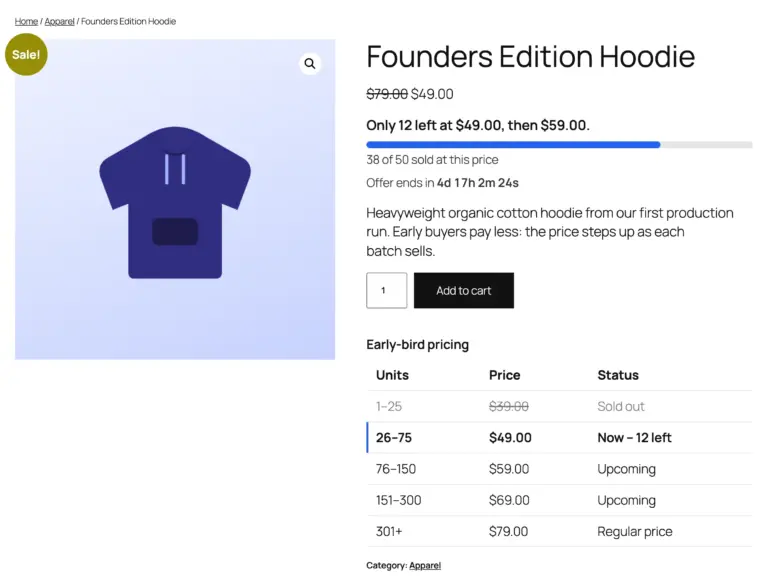
If you want the first buyers of a product to pay less, and the price to go up as units sell, there are several free WooCommerce plugins to choose from on WordPress.org. They don’t all work the same way: some count sales, some follow the clock and some watch your stock. This page compares five of them side by side.
We make TierStep, so we’ve kept to facts you can check: each plugin’s WordPress.org listing and, where the listing didn’t say, the plugin’s own public code. Every source is linked at the end of this page so you can check it yourself. Everything was checked on October 17, 2026. If anything here is out of date, tell us and we’ll fix it.
The plugins at a glance
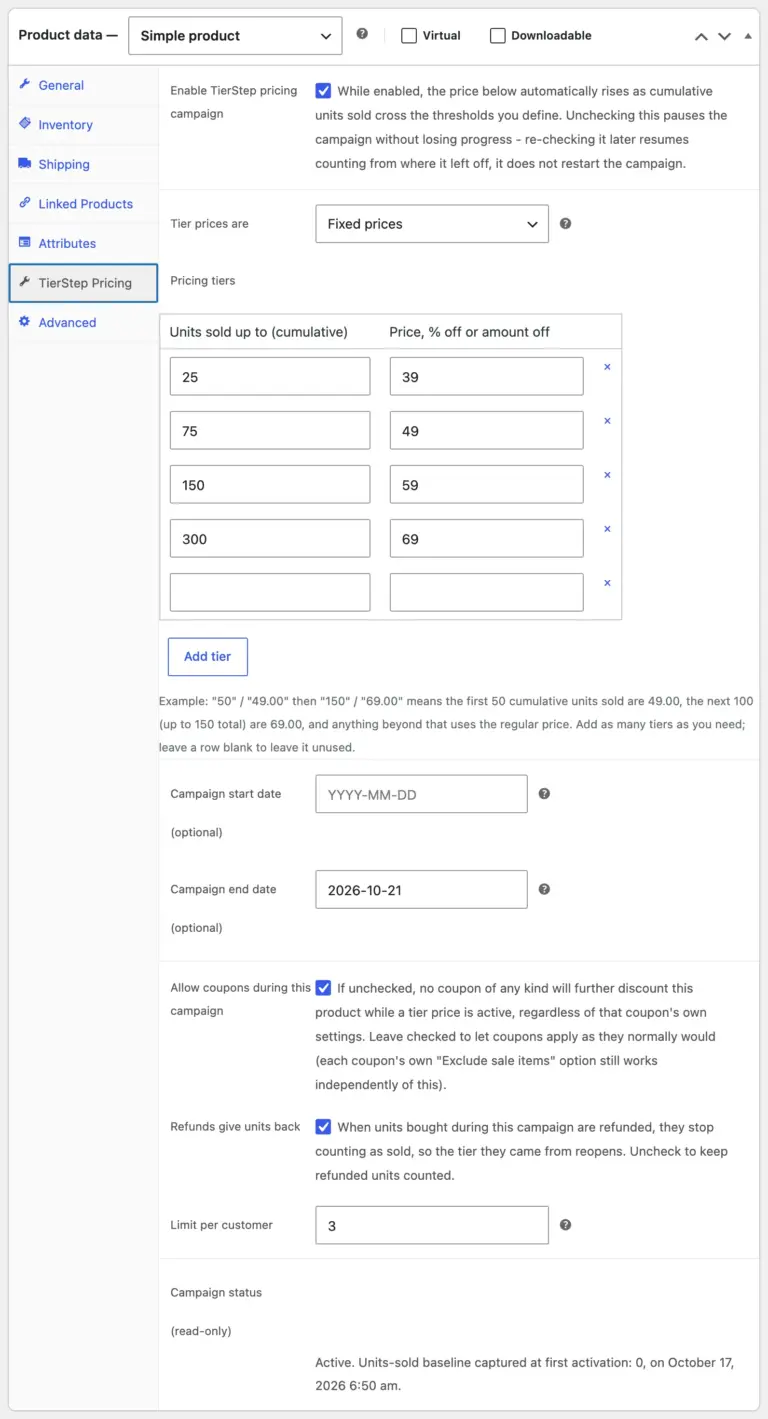
- TierStep: the price steps up as units sell, with every feature free.
- WPC Early Bird Discount for WooCommerce (WPClever): the price steps up as units sell; category, tag and attribute targeting is in its Premium version.
- Drop Prices for WooCommerce (WPGenie): raises or lowers the price by a set amount at set time intervals.
- Raise Prices with Sales for WooCommerce: raises the price after set numbers of completed sales by editing the regular price.
- Stock Level Pricing: changes the price based on how much stock is left; percentage and price-increase rules are Premium.
Side-by-side comparison
“Not stated” means the plugin’s listing doesn’t mention the feature. Every row can be checked in the sources at the end of this page.
| Feature | TierStep | WPC Early Bird Discount | Drop Prices | Raise Prices with Sales | Stock Level Pricing |
|---|---|---|---|---|---|
| Price changes by | Units sold | Units sold | Time | Completed sales | Stock left |
| Cost | Free, no paid version | Free + Premium | Free | Free | Free + Premium |
| Several price steps | Yes | Yes | Repeats every interval | Yes | Yes |
| Step types | Fixed price, % off or amount off | % off or amount off | Fixed or % change per interval | New regular price | Flat price; % in Premium |
| Keeps your saved prices | Yes | Yes | Not stated | No, edits the regular price | Not stated |
| Many products in one campaign | Yes: all, categories, tags, attributes or picked products | All or picked; categories, tags and attributes in Premium | No, per product | Not stated | Yes, global rules |
| Variable products | Yes, each variation priced from its own regular price | Counted on the parent; no units-left badge | Not stated | Not stated | Yes |
| Start and end dates | Yes | Yes | Yes | Not stated | Not stated |
| Countdown | To the end date, and “starts in” before launch | No | To the next price change | Not stated | Not stated |
| Shows what’s left or what’s next | Units left, next price and a progress bar | Units left | Countdown | “Price increases after X sales” notice | Stock level table |
| Tier table on the product page | Yes | Yes | Not stated | Not stated | Yes |
| Badges on shop pages | Yes | Yes | Not stated | Not stated | Not stated |
| Holds units during checkout | Yes | Yes | Not stated | Not stated | Not stated |
| Refunds give units back | Yes | Yes | Not applicable | Not stated | Not applicable |
| Limit per customer | Yes | No | Not stated | Not stated | Not stated |
| Deals page listing all offers | Yes | No | Not stated | Not stated | Not stated |
| Campaign stats and revenue | Yes | No | Not stated | Not stated | Not stated |
| Blocks and shortcodes | 2 blocks, 6 shortcodes | 2 shortcodes | Not stated | Not stated | Not stated |
| Last updated | October 2026 | October 2026 | September 2026 | April 2022 | June 2024 |
| Tested up to | WordPress 7.1 | WordPress 7.1 | WordPress 7.1 | WordPress 5.9 | WordPress 6.5 |
| Requires WordPress | 6.7+ | 5.9+ | 5.0+ | 4.7+ | 4.9+ |
Which one fits your store?
TierStep
Best when you want early bird pricing driven by real sales, with everything free: category-wide campaigns, variable products, countdowns, a progress bar, checkout holds, a limit per customer and stats. It needs WordPress 6.7 or later.
WPC Early Bird Discount for WooCommerce
The closest alternative: it also steps the price by units sold, holds units at checkout, returns refunded units and has a rule simulator. Choose it if your site runs a WordPress version older than 6.7, or if you already use other WPClever plugins. Targeting by category, tag or attribute needs its Premium version.
Drop Prices for WooCommerce
Best when the price should follow the clock rather than sales: a Dutch-auction style drop, or a price that rises every few hours before a launch ends. It doesn’t count units sold.
Raise Prices with Sales for WooCommerce
A simple option that raises the price after set numbers of completed sales. It changes your saved regular price permanently and hasn’t been updated since 2022, so test it carefully on current WordPress and WooCommerce versions.
Stock Level Pricing
Best when the price should follow your stock, for example raising it as stock runs low or discounting leftovers. It works on stock levels rather than sales since a launch, and its percentage and price-increase rules are Premium features.
Early bird pricing vs bulk discounts
All five plugins change the price for everyone. If you want a lower price when one customer buys more units in one order, you need a bulk (quantity) discount plugin instead. That’s a different job.
Sources
How we checked: we read each plugin’s WordPress.org listing (description, FAQ and details panel) on October 17, 2026. Where a listing didn’t cover something, we read the plugin’s public code in the WordPress.org plugin repository. We didn’t install or benchmark the other plugins.
- TierStep 2.0.0: WordPress.org listing and the TierStep documentation.
- WPC Early Bird Discount for WooCommerce 1.0.2: WordPress.org listing for units-sold tiers, discount types, Premium-only category, tag and attribute targeting, slot reservation, refund restore, tier table, badges, simulator and requirements.
- WPC Early Bird Discount, plugin code (version 1.0.2): includes/class-frontend.php. Line 60 counts variations on the parent product, line 894 skips the units-left badge for variable products, and lines 48 and 49 register its two shortcodes. Countdowns, a progress bar, a per-customer limit, a deals list, revenue stats and blocks appear neither in the listing nor in the plugin code.
- Drop Prices for WooCommerce 2.1: WordPress.org listing for time-interval price changes, fixed or percentage changes, per-product setup, the timeframe and the countdown to the next price change.
- Raise Prices with Sales for WooCommerce 1.3.1: WordPress.org listing and FAQ for sales points, editing the regular price directly and counting completed orders.
- Stock Level Pricing 1.0.3: WordPress.org listing and FAQ for stock-based pricing, Premium-only percentage and price-increase rules, global rules, variable products and the stock level table.
- Last updated, tested up to and required WordPress version: the details panel of each WordPress.org listing above.
Try TierStep
TierStep is free on WordPress.org, with nothing locked. Follow the getting started guide to set up your first campaign, or read how to set up early bird pricing in WooCommerce step by step.
WooCommerce is a trademark of Automattic Inc. Other product names belong to their owners. CommerceWP isn’t affiliated with the other plugins on this page.