

TierStep – Early Bird Pricing for WooCommerce
Free early bird and launch pricing for WooCommerce: the price steps up automatically as units sell. Countdowns, progress bars, store-wide campaigns and fair checkout. No Pro version.
Free, with nothing locked. Check out with your email and we’ll send you the download. View details on WordPress.org ↗
TierStep gives WooCommerce real early bird pricing. Set price steps by units sold, for example the first 50 at $19, the next 100 at $29, then the regular price, and the price increases automatically as each step sells out. No manual price edits, no coupon codes.
Use it for product launches, limited first batches, pre-sales, Kickstarter-style reward tiers, and early-bird tickets or course places. The urgency is honest: the cheaper price runs out because it actually sold.
What TierStep does
Pricing and campaigns
- As many price steps as you need, as fixed prices, a percentage off or an amount off the regular price
- Simple and variable products: variations share one count and each is priced from its own regular price
- Store-wide campaigns for all products, categories, tags, attribute terms or picked products, with priorities and exclusions
- Optional start and end dates; pause any time without losing progress
- Choose per campaign whether coupons can discount early-bird prices further
What shoppers see
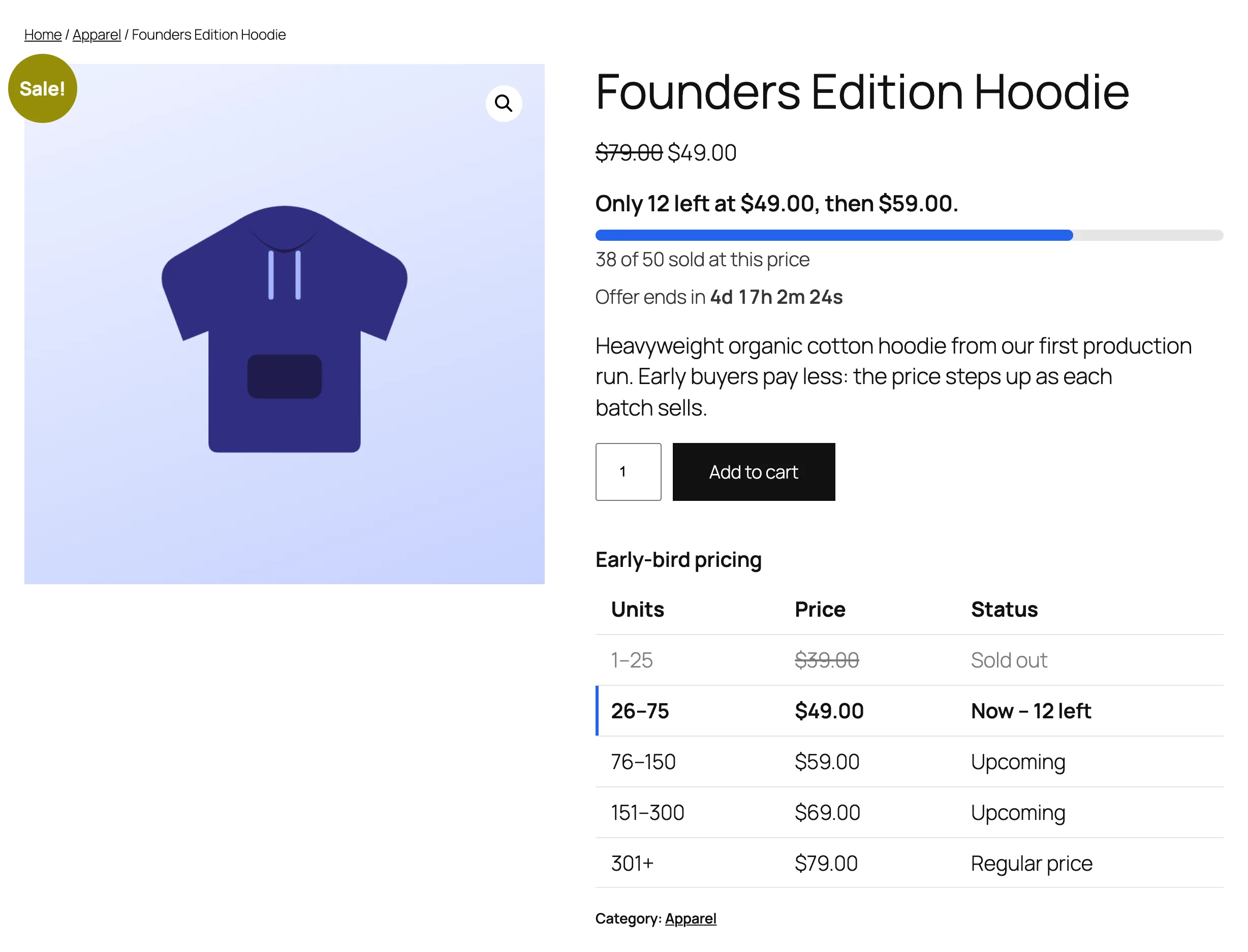
- “Only 12 left at $19, then $29.” under the price, with a progress bar for the current price
- A live countdown to the end, and a “starts in” countdown with the early-bird price before launch
- A tier table showing sold-out, current and upcoming prices
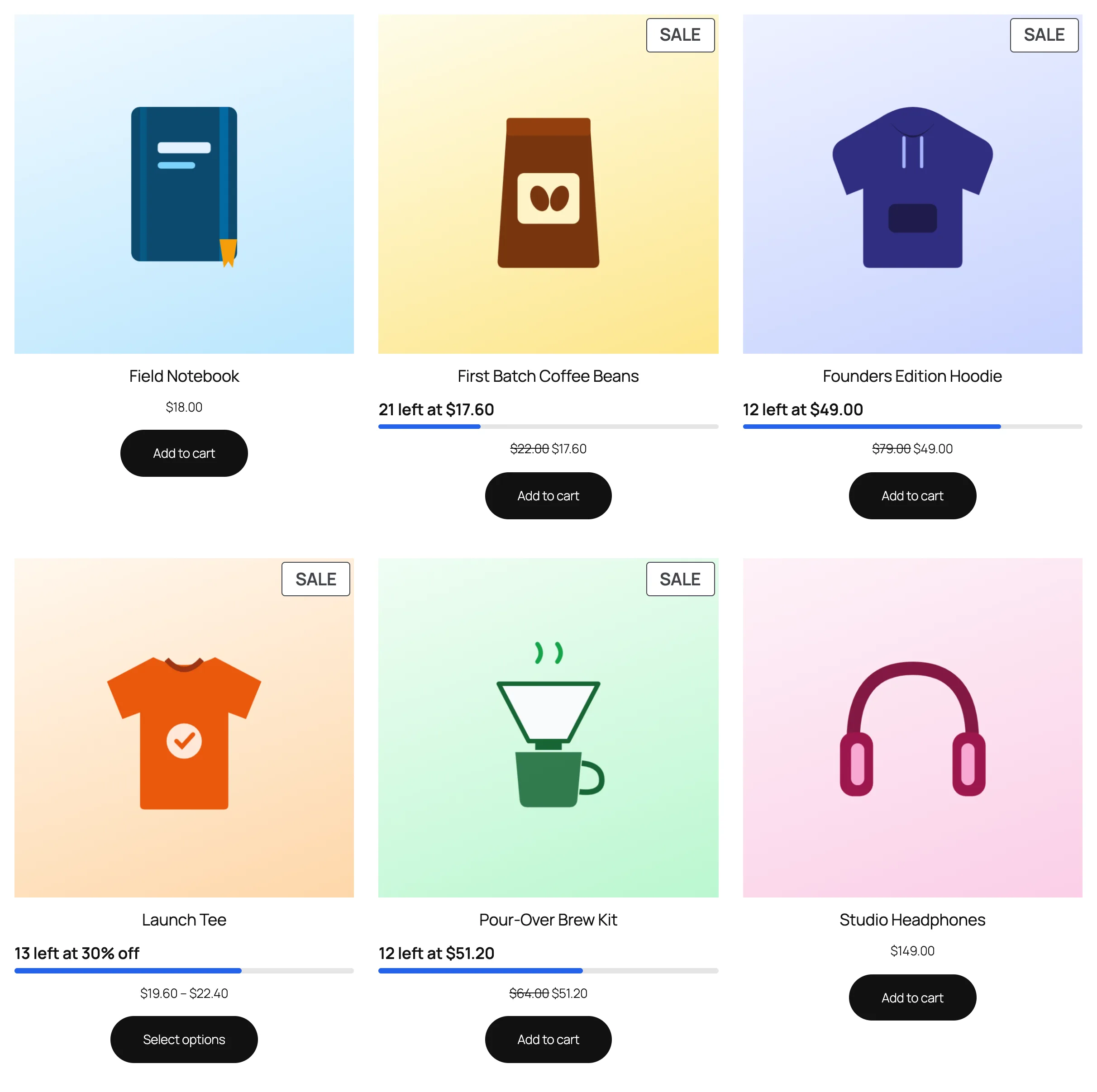
- “12 left at $19” badges on shop and category pages
- An early-bird deals page with one shortcode or block
Fair, safe launches
- Checkout holds keep a buyer’s early-bird units while they pay, so two shoppers can’t take the same last units
- A limit per customer stops one buyer taking the whole cheap tier
- Refunds give units back to the tier they were sold at
- No order can take more units than the current tier has left, on classic and block checkouts
For you
- A status box on every product: which campaign applies and why, units counted, current tier, next price and revenue
- Campaign stats for store-wide campaigns
- Reword every message shoppers see; two blocks and six shortcodes
- Works with classic and block themes, HPOS and the Cart and Checkout blocks
How it works
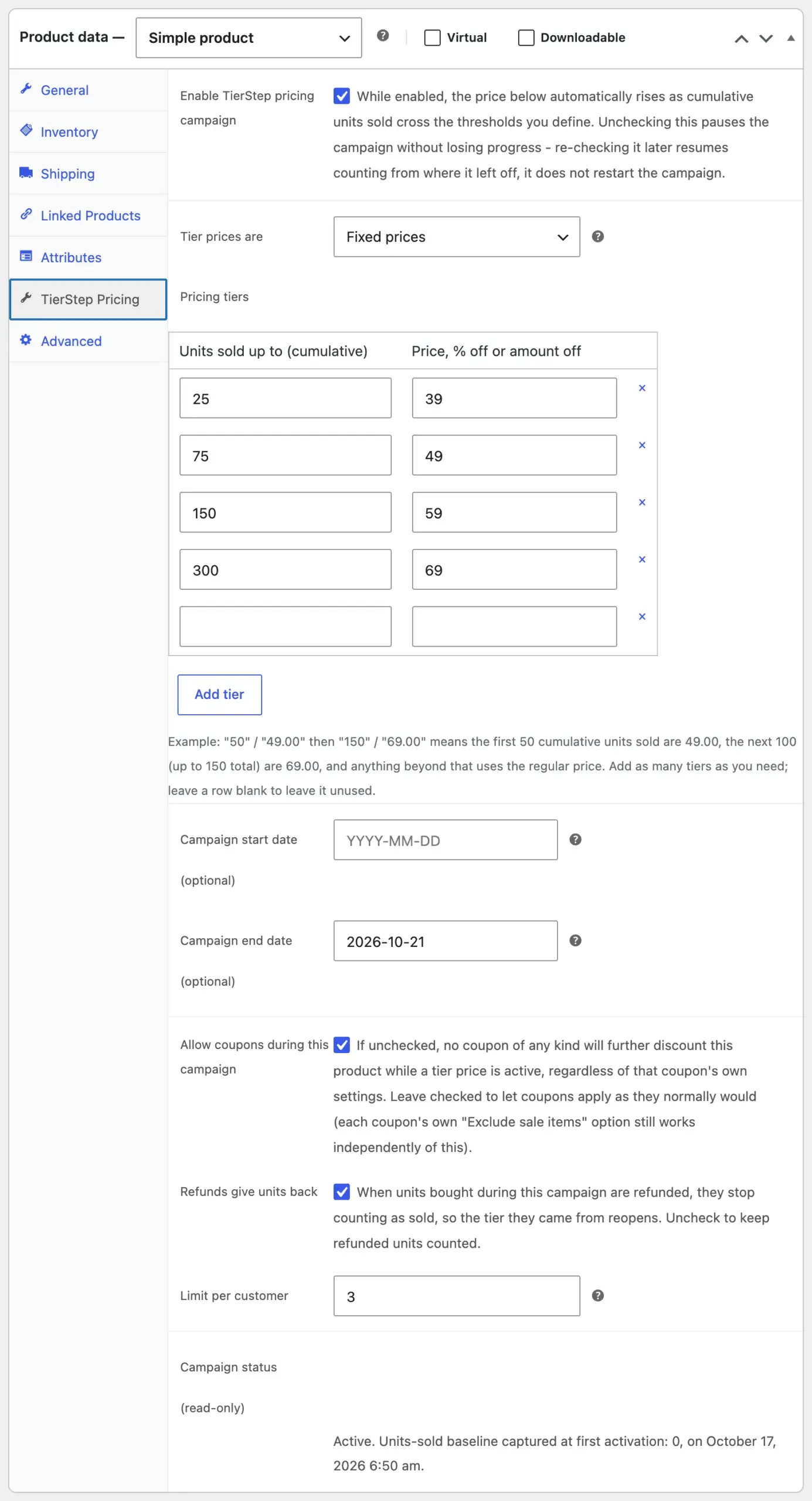
- Edit a product and open the TierStep Pricing tab.
- Add your price steps (units sold up to, and the price) and, if you like, start and end dates.
- Publish. TierStep shows the offer and moves to the next price the moment a step sells out.
100% free, no Pro version
Every feature on this page is included. There is no paid version, no upgrade prompts and no feature limits.
Early bird pricing vs bulk discounts
Bulk discounts lower the price when one customer buys more units in one order. TierStep changes the price for everyone as total sales grow. If you’re launching something and want early buyers to get the best deal, you want early bird pricing.
Requirements
- WordPress 6.7 or later
- PHP 7.4 or later
- WooCommerce 8.0 or later (tested up to 11.2)
- Simple and variable products (grouped and external products aren’t supported)
Installation
- Click Buy Now and check out with your email; it’s free.
- Download the zip from the receipt email or your CommerceWP account.
- In WordPress, go to Plugins → Add New Plugin → Upload Plugin, upload the zip and activate it.
- Edit a product and open the TierStep Pricing tab.
Updates arrive automatically through WordPress.org.
Learn more
- TierStep documentation, with step-by-step guides and screenshots
- Getting started: your first campaign in two minutes
- How to set up early bird pricing in WooCommerce
- WooCommerce early bird plugins compared, with sources for every claim
0 Reviews
Unable to load reviews. Please try again later.
No reviews yet. Be the first to write a review!